What Are Categories in Joomla 6?
Categories are used in Joomla 6 to organize related content into logical groups.
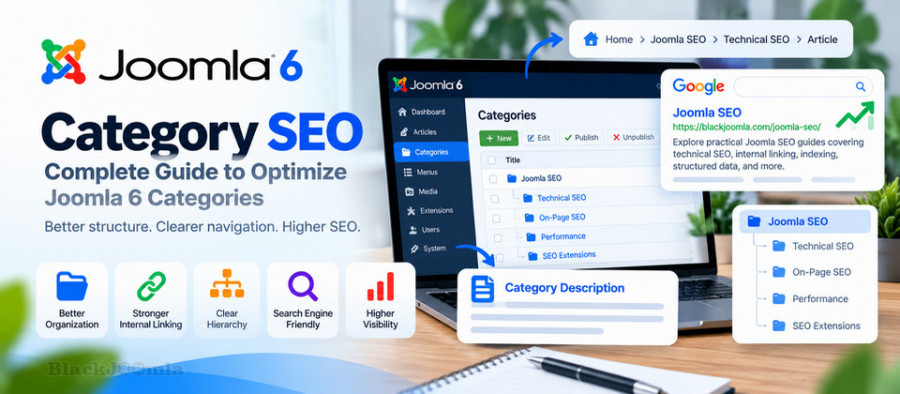
For example, a Joomla website about SEO could have categories such as:
Joomla SEO
├── Technical SEO
├── On-Page SEO
├── Performance
└── SEO Extensions
This structure makes it easier for visitors to find related articles and helps create a logical relationship between individual articles and broader topics.
Why Are Joomla 6 Categories Important for SEO?
Categories are not simply an administrative feature. They can become useful landing pages that connect multiple related articles.
A well-structured category system can help:
- Organize related content.
- Improve website navigation.
- Strengthen internal linking.
- Create a clear information hierarchy.
- Help users discover related articles.
- Provide search engines with additional context.
- Support a scalable content architecture.
However, creating a large number of empty or nearly empty categories does not automatically improve SEO. Each category should have a clear purpose.
How Joomla 6 Categories Work
Joomla 6 uses a hierarchical category system that allows content to be organized into parent and child categories.
For example:
Joomla
└── SEO
    ├── Technical SEO
    ├── On-Page SEO
    └── SEO Extensions
This hierarchy can then be reflected in navigation, breadcrumbs, menu items, and internal links.
How to Create an SEO-Friendly Joomla 6 Category
When creating a category, do not start by creating as many categories as possible.
Instead, determine what content belongs together and create categories around meaningful topics.
Use a Clear Category Name
The category name should clearly describe the content that belongs inside it.
For example:
Joomla SEO
is more useful than a vague category such as:
Articles
A descriptive category name also makes navigation easier for visitors.
Use a Short and Descriptive Alias
The category alias should normally be short, readable, and relevant to the category topic.
For example:
joomla-seo
is clearer than a long alias containing unnecessary words.
Optimize the Joomla 6 Category Title
The category title should clearly communicate the topic of the page.
For example:
Joomla SEO
or:
Joomla 6 SEO
depending on the actual scope of the category.
Avoid creating multiple categories with almost identical names because this can make your website structure unnecessarily confusing.
Write Useful Category Descriptions
A category page should not simply be a list of article titles.
Where appropriate, add a useful introductory description explaining what visitors will find in the category.
For example:
Explore practical Joomla SEO guides covering technical SEO,
site structure, indexing, structured data, internal linking,
performance, and other search optimization topics.
This gives users and search engines additional context about the purpose of the category.
Do Not Create Thin Category Pages
One of the most common category SEO problems is creating categories that contain little or no useful content.
For example:
Category A
- Article 1
A category containing only one weak article may not provide much value as a standalone landing page.
Before creating a category, consider whether it will contain enough relevant content to justify its existence.
Joomla 6 Category Pages and Internal Linking
Category pages can become important hubs within your internal linking structure.
For example:
Homepage
   ↓
Joomla SEO
   ↓
Technical SEO
   ↓
Individual Articles
The category provides a central location from which users can discover multiple related articles.
This is particularly useful for websites that publish content regularly.
For more information about internal linking, read:
Joomla Internal Linking: Complete SEO Guide
Categories and Joomla Breadcrumbs
Categories can also contribute to the breadcrumb hierarchy of your Joomla website.
A typical structure could look like:
Home > Joomla SEO > Technical SEO > Current Article
This makes the relationship between the current article and its parent category clearer.
For more information about breadcrumb optimization, read:
How to Optimize Joomla 6 Breadcrumbs for SEO: Complete Guide
Joomla 6 Category Blog Layout
Joomla 6 provides category blog and category list layouts for displaying articles belonging to a category.
A category blog page can display multiple articles using elements such as:
- Leading articles.
- Intro articles.
- Columns.
- Article titles.
- Intro text.
- Read More links.
- Pagination.
The exact presentation depends on the menu item configuration and the selected template.
Joomla documentation provides category blog settings including article ordering and pagination controls. :contentReference[oaicite:0]{index=0}
Optimize the Category Blog Layout
The category page should make it easy for users to understand the available content.
A useful category page can include:
- A clear category title.
- A concise category introduction.
- Relevant article titles.
- Short introductory text.
- Clear Read More links.
- Logical pagination.
Avoid displaying excessive information that makes the page difficult to scan.
Joomla 6 Category Pagination and SEO
Large categories may contain dozens or hundreds of articles. In these cases, pagination allows the content to be divided across multiple pages.
For example:
/joomla-seo/
/joomla-seo/page-2
/joomla-seo/page-3
Pagination should provide a clear path for visitors to discover additional articles.
Joomla provides pagination options for category layouts, including showing pagination automatically when additional pages are required. :contentReference[oaicite:1]{index=1}
Do not disable pagination simply because you are concerned about having multiple category pages. The priority should be creating a usable and crawlable content structure.
Choose the Right Number of Articles Per Page
There is no universal number that is ideal for every Joomla website.
The appropriate number depends on:
- Article length.
- Image usage.
- Page performance.
- Template design.
- Mobile usability.
- The purpose of the category.
Avoid creating extremely long category pages simply to reduce pagination.
Categories and SEO-Friendly URLs
Your category structure can influence the URLs used by your website.
A clean structure might look like:
https://example.com/joomla-seo/
https://example.com/joomla-seo/internal-linking.html
The exact URL structure depends on your Joomla routing and menu configuration.
The important principle is consistency.
For more information, read:
How to Configure SEF URLs in Joomla: Complete Guide
Categories and Canonical URLs
Category pages can also require careful canonicalization when multiple URLs or navigation paths can lead to the same content.
Do not assume that creating a category automatically solves URL duplication.
Review the actual URLs generated by your Joomla website and make sure the preferred version of each important page is clear.
Canonical URLs should identify the preferred URL rather than being used to hide structural problems.
For more information, read:
How to Fix Duplicate Content in Joomla: Canonical URLs & SEO
Should Joomla Category Pages Be Indexed?
There is no universal rule that every category page must be indexed or that every category page should be excluded.
The decision should depend on the value of the category page.
A category can be a good candidate for indexing when it:
- Contains several relevant articles.
- Targets a meaningful topic.
- Provides useful navigation.
- Has a clear and descriptive title.
- Contains useful introductory content.
- Offers a logical collection of related resources.
A low-value or empty category may not deserve the same treatment as an important content hub.
Do Not Create Categories Only for Keywords
One common SEO mistake is creating a separate category for every keyword variation.
For example, creating categories such as:
Joomla SEO
Joomla SEO Tips
Joomla SEO Guide
Joomla SEO Optimization
Joomla SEO Techniques
can create unnecessary duplication in the website structure.
Instead, use one strong category when the topics genuinely belong together and organize individual articles around more specific search intents.
Use Categories to Build Topic Clusters
Categories can provide the structural foundation for topic clusters.
For example:
Joomla SEO
│
├── Technical SEO
│   ├── SEF URLs
│   ├── Canonical URLs
│   ├── XML Sitemap
│   └── Robots.txt
│
├── On-Page SEO
│   ├── Meta Tags
│   ├── Image SEO
│   └── Internal Linking
│
└── Structured Data
    └── Schema Markup
This structure allows related articles to be connected through categories and internal links.
It also gives you a clear framework for expanding your content over time.
Categories and XML Sitemaps
Category pages and XML sitemaps serve different purposes.
A category page is a user-facing content hub, while an XML sitemap helps search engines discover URLs that you want to make available for crawling.
If an important category page is intended to be indexed, make sure your site's overall linking and sitemap strategy does not accidentally isolate it.
Read more:
How to Create an XML Sitemap in Joomla: Complete Guide
Categories and BreadcrumbList Structured Data
If breadcrumbs are implemented on your website, category levels may appear as part of the breadcrumb hierarchy.
For example:
Home
> Joomla SEO
> Technical SEO
> Current Article
If your website generates BreadcrumbList structured data, make sure the structured data accurately reflects the visible navigation structure.
Do not generate duplicate Schema markup through multiple SEO extensions or custom code.
Read more:
How to Add Schema Markup to Joomla: Complete Guide
Category Pages and Meta Descriptions
Important category pages should have descriptive metadata when your Joomla configuration and template support it.
A category meta description should explain what the visitor will find on the page.
For example:
Explore practical Joomla SEO guides covering technical SEO,
internal linking, indexing, structured data, performance,
and website optimization.
Avoid stuffing the description with repeated keywords.
Optimize Category Images
If your Joomla template displays an image on category pages, optimize that image for performance and accessibility.
Consider:
- Appropriate image dimensions.
- Efficient image formats.
- Descriptive alternative text where applicable.
- Reasonable file size.
- Responsive presentation.
Images should support the category page rather than significantly increasing its loading time.
Mobile Optimization for Joomla Categories
Category pages must work well on mobile devices because users may discover your content through smartphones.
Check:
- Category title visibility.
- Article title readability.
- Thumbnail sizes.
- Pagination usability.
- Navigation elements.
- Spacing between links.
- Page loading performance.
A category page that works well on desktop but is difficult to navigate on mobile provides a poor user experience.
Common Joomla 6 Category SEO Problems
Empty Categories
Remove, merge, or reconsider categories that do not contain meaningful content.
Too Many Categories
A large number of overlapping categories can make the website difficult to understand and maintain.
Duplicate Category Topics
Several categories targeting almost the same topic can fragment related content.
Category Pages With No Introduction
Important category pages can benefit from a concise introduction that explains the topic and purpose of the page.
Poor Pagination
Check that users can navigate between category pages and that pagination does not create broken or confusing navigation.
Category Pages Are Difficult to Discover
Important categories should be reachable through the site's navigation and internal links.
Inconsistent Category Structure
Review parent and child categories regularly and make sure the hierarchy reflects the actual organization of your content.
How to Audit Joomla 6 Categories for SEO
- List all categories on the website.
- Identify empty or nearly empty categories.
- Find categories covering overlapping topics.
- Review parent and child relationships.
- Check category titles and aliases.
- Review category descriptions.
- Check category URLs.
- Test category pagination.
- Check internal links to important categories.
- Review breadcrumbs.
- Check canonical URLs where relevant.
- Review indexability of valuable category pages.
- Check important categories on mobile devices.
- Verify that important category pages can be discovered through normal site navigation.
Joomla 6 Category SEO Checklist
- Create categories around meaningful topics.
- Use clear and descriptive category names.
- Keep category aliases short and readable.
- Add useful category descriptions.
- Avoid unnecessary category duplication.
- Do not create categories only for keyword variations.
- Use categories to organize related content.
- Connect category pages with internal links.
- Use breadcrumbs consistently.
- Check category URLs and SEF configuration.
- Review canonical URLs where necessary.
- Configure pagination appropriately.
- Optimize category images when used.
- Make category pages mobile-friendly.
- Keep valuable category pages accessible through site navigation.
- Review category structure regularly as the website grows.
Frequently Asked Questions
Are Joomla 6 category pages important for SEO?
They can be. A well-organized category page can function as a useful content hub that connects related articles and provides a clearer website structure.
Should every Joomla category be indexed?
No. Indexability should depend on the value and purpose of the category page. Important, useful category hubs can be valuable, while empty or low-value categories may not provide the same benefit.
How many articles should a Joomla category contain?
There is no universal minimum. The category should contain enough relevant content to provide a meaningful collection of resources for visitors.
Should I create a category for every SEO keyword?
No. Categories should represent meaningful content groups rather than individual keyword variations. Excessive keyword-based categories can create a confusing website structure.
Do Joomla categories improve internal linking?
They can. Category pages provide a central location from which visitors can discover multiple related articles, creating another layer of internal navigation.
Should Joomla category pages have meta descriptions?
Important category pages can benefit from descriptive metadata. The description should accurately summarize the category rather than simply repeating keywords.
Final Thoughts
Joomla 6 categories can play an important role in building a clean, scalable, and search-friendly website structure.
The goal is not to create as many categories as possible. Instead, create a logical hierarchy that groups genuinely related content and makes important topics easy to discover.
Strong category pages can work together with internal links, breadcrumbs, SEF URLs, canonical URLs, XML sitemaps, and structured data to create a more coherent Joomla SEO architecture.
As your website grows, review your category structure regularly and consolidate overlapping or low-value categories instead of allowing the taxonomy to become unnecessarily complicated.