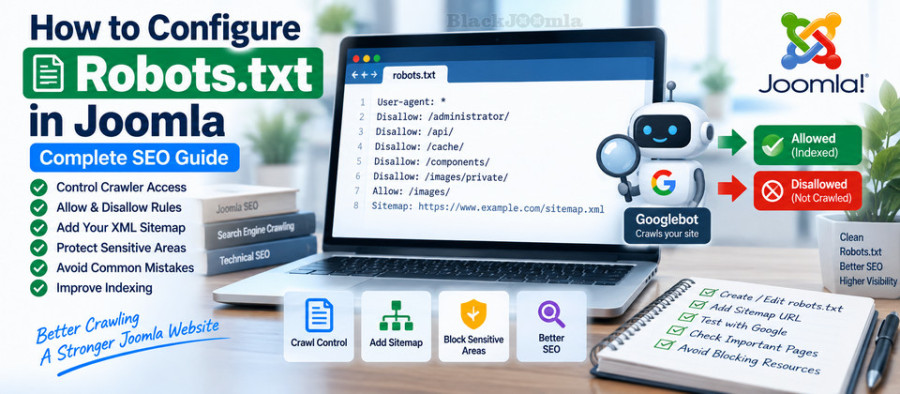
What Is robots.txt?
Robots.txt is a plain-text file that provides crawling instructions to automated web crawlers. Search engines such as Google use it to determine which URLs or directories they are allowed to request from your website.
The file uses the Robots Exclusion Protocol and normally resides in the root directory of the website.
For example:
User-agent: *
Disallow: /private/
This rule tells crawlers that the /private/ path should not be crawled.
Where Is robots.txt Located in Joomla?
A standard Joomla installation includes a robots.txt file in the Joomla root directory.
For a website such as:
https://example.com/
the robots.txt file should normally be available at:
https://example.com/robots.txt
Joomla's current documentation states that robots.txt must be located in the root of the domain or subdomain. A robots.txt file placed inside a Joomla subdirectory is not used for that subdirectory by crawlers. ([Joomla Documentation](https://guide.joomla.org/user-manual/configuration/configuration-robots-txt-file))
How to Check Your Joomla robots.txt
The easiest way to check your file is to open it directly in your browser.
For example:
https://yourdomain.com/robots.txt
You should see plain text containing rules such as:
User-agent: *
Disallow: /administrator/
Disallow: /api/
Disallow: /cache/
If you receive a 404 error, HTML page, server error, or unexpected content, investigate the server configuration before changing your SEO settings.
Joomla's Default robots.txt
Joomla provides a standard robots.txt file with rules designed to prevent crawlers from accessing certain system directories.
A current Joomla installation can contain rules similar to:
User-agent: *
Disallow: /administrator/
Disallow: /api/
Disallow: /bin/
Disallow: /cache/
Disallow: /cli/
Disallow: /components/
Disallow: /includes/
Disallow: /installation/
Disallow: /language/
Disallow: /layouts/
Disallow: /libraries/
Disallow: /logs/
Disallow: /modules/
Disallow: /plugins/
Disallow: /tmp/
The exact contents of your file should be reviewed against your Joomla version and website configuration rather than replaced blindly.
Understanding User-agent
The User-agent directive specifies which crawler the following rules apply to.
For example:
User-agent: *
Disallow: /private/
The asterisk means that the rule applies to all crawlers covered by the robots.txt protocol.
You can also create rules for a specific crawler:
User-agent: Googlebot
Disallow: /private/
However, specific crawler rules should only be used when you have a clear technical reason to treat that crawler differently.
What Does Disallow Mean?
The Disallow directive tells a crawler not to crawl a specified path.
For example:
User-agent: *
Disallow: /temporary/
This tells crawlers not to crawl URLs under the /temporary/ path.
Another example:
User-agent: *
Disallow: /administrator/
This is commonly used to prevent search-engine crawlers from crawling the Joomla administrator directory.
What Does Allow Mean?
The Allow directive can be used to permit crawling of a path that would otherwise be blocked by a broader rule.
For example:
User-agent: *
Disallow: /private/
Allow: /private/public/
Rules involving Allow and Disallow should be tested carefully because crawler behavior depends on the matching paths and the applicable user-agent group.
How to Add Your Joomla Sitemap to robots.txt
Adding your XML sitemap to robots.txt is a useful way to make the sitemap location discoverable to crawlers.
For example:
User-agent: *

Disallow: /administrator/

Sitemap: https://example.com/sitemap.xml
The Sitemap value should be a complete URL including the protocol and hostname.
Google's current robots.txt specification supports the Sitemap field and allows multiple sitemap declarations. ([Google Search Central](https://developers.google.com/crawling/docs/robots-txt/robots-txt-spec))
If you have not created an XML sitemap yet, see our complete guide on how to create an XML sitemap in Joomla.
robots.txt Does Not Create a Sitemap
The Sitemap directive only tells crawlers where your sitemap is located. It does not generate the sitemap.
Your Joomla website still needs an actual XML sitemap, usually generated by Joomla core functionality or a dedicated sitemap extension.
For larger Joomla websites, you can also consider dedicated sitemap solutions such as JSitemap Pro or OSMap.
robots.txt vs. Noindex
One of the most common Joomla SEO mistakes is confusing robots.txt with the noindex directive.
They serve different purposes.
| Method | Purpose |
|---|---|
| robots.txt | Controls whether crawlers should crawl specified paths |
| noindex | Instructs search engines not to index a page |
| 301 redirect | Redirects one URL to another URL |
| Canonical | Indicates the preferred URL among duplicate or similar URLs |
This distinction is extremely important.
If your goal is to prevent a page from appearing in search results, simply blocking the URL in robots.txt is not necessarily the correct solution. Google explains that a URL blocked from crawling can potentially still be indexed without its content being crawled.
For pages that should not be indexed, use an appropriate indexing control such as a noindex directive when the situation requires it.
Should You Block Joomla System Directories?
Joomla's standard robots.txt already contains rules for several system directories.
Do not add large numbers of additional Disallow rules simply because a directory name looks technical or unimportant.
Search engines may need access to certain resources such as CSS, JavaScript, images, or other files to properly render and understand a page.
Before blocking a directory, determine exactly what resources are stored there and whether they are required for rendering public pages.
Do Not Use robots.txt for Website Security
robots.txt is not a security mechanism.
A robots.txt file is publicly accessible. Anyone can open:
https://example.com/robots.txt
and see the paths you have listed.
Therefore, never use robots.txt as the only protection for confidential information, private files, administration systems, or sensitive data.
Use proper server authentication, access control, permissions, firewall rules, or other security mechanisms when content actually needs to be protected.
Should You Disallow the Joomla Administrator Directory?
Joomla's standard robots.txt includes:
Disallow: /administrator/
This prevents compliant crawlers from requesting URLs under the administrator directory.
However, this should not be confused with access protection. The Joomla administrator area should still be protected by Joomla's authentication and appropriate server-level security.
robots.txt and Joomla SEF URLs
Robots.txt rules operate on URL paths, so your website's URL structure matters.
For example, if your Joomla website uses:
https://example.com/products/
you need to understand how that path corresponds to your actual Joomla routing and menu structure before creating a Disallow rule.
Incorrect robots.txt rules can unintentionally block important pages.
If you are configuring your Joomla URL structure, see our guide on how to configure SEF URLs in Joomla.
Common robots.txt Mistakes in Joomla
1. Blocking the Entire Website
This is one of the most dangerous configuration mistakes:
User-agent: *
Disallow: /
This tells crawlers not to crawl the entire website.
Never use this on a production website unless you intentionally want to block crawling.
2. Blocking Important Content
A rule such as:
Disallow: /blog/
can prevent crawlers from accessing every URL under the blog path.
Always verify that the path does not contain important content before adding a Disallow rule.
3. Blocking CSS or JavaScript Resources
Blocking resources required to render your public pages can interfere with how search engines understand your website.
Do not block a directory simply because it contains technical files.
4. Using robots.txt to Hide Private Content
Do not place sensitive URLs in robots.txt as a security measure.
Use authentication and access control instead.
5. Blocking a URL Instead of Using Noindex
If Google needs to crawl a page to see a noindex directive, blocking the page in robots.txt can prevent Google from seeing that directive.
Choose the mechanism according to your actual SEO objective.
6. Adding Unsupported Directives
Do not assume that every crawler-related directive found online is supported by Google.
For example, Google's current robots.txt documentation states that fields such as crawl-delay are not supported by Google.
How to Edit robots.txt in Joomla
The exact method depends on your hosting environment and how you manage your Joomla files.
You can generally edit the file through:
- Hosting control panel file manager
- FTP or SFTP
- SSH
- Your hosting provider's file management tools
Because robots.txt is a plain-text file, use a text editor that does not introduce unwanted formatting or HTML.
After editing, always check the live file at:
https://yourdomain.com/robots.txt
Joomla Installed in a Subdirectory
If Joomla is installed in a subdirectory such as:
https://example.com/joomla/
the robots.txt file should be located at the domain root:
https://example.com/robots.txt
Joomla's documentation also notes that the Joomla directory name must be included in the paths used by the rules.
For example:
Disallow: /joomla/administrator/
rather than simply:
Disallow: /administrator/
How to Test Joomla robots.txt
After making changes, test the live file rather than assuming the saved version is correct.
Step 1: Open the File
https://yourdomain.com/robots.txt
Step 2: Check the Syntax
Verify that:
- User-agent is correctly written.
- Disallow paths begin with the correct URL path.
- Allow rules are intentional.
- Sitemap URLs are complete.
- There are no accidental spaces or formatting problems.
- The file is plain text.
Step 3: Test Important URLs
Review important pages and make sure you have not accidentally blocked their paths.
Step 4: Check Google Search Console
Use Google Search Console and URL Inspection when investigating crawling or indexing problems.
If an important URL is not appearing in Google, do not immediately assume that robots.txt is the cause. Check indexing status, canonical URLs, redirects, HTTP responses, internal links, and other technical factors.
robots.txt and XML Sitemap: How They Work Together
Robots.txt and XML sitemaps perform different but complementary functions.
- robots.txt: provides crawling rules.
- XML sitemap: provides a list of URLs that you want search engines to discover.
A typical configuration can therefore look like:
User-agent: *
Disallow: /administrator/
Disallow: /tmp/

Sitemap: https://example.com/sitemap.xml
Do not use robots.txt to block your sitemap. The sitemap should be accessible to crawlers.
Can robots.txt Improve Joomla SEO?
Robots.txt is primarily a crawling-control mechanism, not a direct ranking tool.
Its SEO value comes from helping you control crawler access and avoid unnecessary crawling of areas that should not be crawled.
However, incorrect robots.txt rules can create serious SEO problems by preventing search engines from accessing important content or resources.
For this reason, robots.txt should be treated as part of your broader technical SEO configuration.
robots.txt and 404 Errors
Robots.txt does not replace proper URL management.
If a page has been permanently removed and has a relevant replacement, a 301 redirect may be appropriate. If the URL should remain unavailable, returning the correct HTTP status may be better than creating unnecessary redirects.
For more information, see our guides on fixing 404 errors in Joomla and creating 301 redirects in Joomla.
robots.txt and Duplicate Content
Do not automatically use robots.txt to solve duplicate-content problems.
Duplicate URLs often require a different solution, such as canonical URLs, URL normalization, internal-link corrections, or redirects.
Read our complete guide on fixing duplicate content in Joomla for a more detailed explanation.
Best Practices for Joomla robots.txt
- Keep the file simple and understandable.
- Place robots.txt in the correct root location.
- Do not block important public content.
- Do not use robots.txt as a security mechanism.
- Do not block CSS or JavaScript resources without a clear reason.
- Use noindex when your goal is indexing control rather than crawling control.
- Add your XML sitemap URL when appropriate.
- Use absolute sitemap URLs.
- Test important URLs after making changes.
- Review robots.txt after Joomla migrations or major URL changes.
- Keep a backup of your previous working configuration.
Joomla robots.txt Checklist
- Is
https://yourdomain.com/robots.txtaccessible? - Is the file located in the domain root?
- Does it contain the intended User-agent rules?
- Are important Joomla pages crawlable?
- Are CSS and JavaScript resources unnecessarily blocked?
- Is the administrator directory appropriately disallowed?
- Are private areas protected by real access controls?
- Is the XML sitemap URL included?
- Is the sitemap itself crawlable?
- Have recent URL changes been reviewed?
- Have important URLs been checked in Google Search Console?
Frequently Asked Questions
Where is robots.txt in Joomla?
It is normally located in the root directory of your Joomla website and should be accessible through https://yourdomain.com/robots.txt.
Does Joomla have a default robots.txt file?
Yes. Joomla includes a standard robots.txt file containing rules for several system directories. You should review the file before making custom changes.
Does robots.txt prevent Google from indexing a page?
Not reliably. Robots.txt controls crawling, while indexing is a separate process. Google can potentially know about a blocked URL and may index the URL without crawling its content.
Should I add my sitemap to robots.txt?
Yes, adding the full sitemap URL using the Sitemap field is a useful practice and is supported by major search engines including Google.
Can robots.txt protect private Joomla files?
No. Robots.txt is publicly accessible and should never be treated as an access-control or security mechanism.
Should I block /administrator/ in Joomla?
Joomla's standard robots.txt includes a rule for the administrator directory. However, robots.txt does not replace authentication or other security controls.
Final Thoughts
A properly configured robots.txt file is an important part of Joomla technical SEO. It gives search-engine crawlers instructions about which areas of your website should or should not be crawled.
The most important rule is to keep your configuration intentional. Do not block URLs simply because they look technical, and do not use robots.txt as a substitute for noindex, canonical URLs, redirects, or website security.
For a complete Joomla SEO strategy, combine a carefully configured robots.txt file with XML sitemaps, clean SEF URLs, canonicalization, proper redirects, and accurate indexing controls.
For more Joomla SEO techniques, explore our guide to the best Joomla SEO extensions.