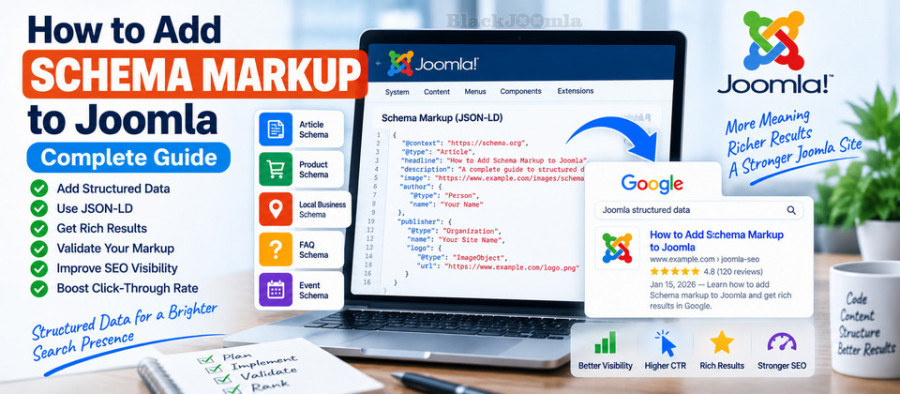
In this guide, you will learn how to add Schema markup to Joomla, what structured data is, which Schema types are useful, how JSON-LD works, how to validate your markup, and when a Joomla Schema extension can make implementation easier.
What Is Schema Markup?
Schema markup is structured information added to a web page using a standardized vocabulary such as Schema.org. It helps search engines understand the meaning and context of the information presented on a page.
For example, a normal page may contain a title such as:
Best Joomla SEO Extensions
Structured data can provide additional context about that page, such as its title, author, publication date, organization, or content type.
Google uses structured data to better understand page content and supports structured-data-powered search features for content types such as articles, breadcrumbs, products, organizations, events, recipes, videos, local businesses, and more. :contentReference[oaicite:1]{index=1}
Why Is Schema Markup Important for Joomla SEO?
Joomla already provides many useful SEO features, including metadata, SEF URLs, menu structures, and extensions for technical SEO. Schema markup adds another layer of information that helps search engines interpret your content.
Depending on the content type and Google's current eligibility requirements, structured data can make a page eligible for enhanced search-result features.
However, Schema markup should not be viewed as a guarantee of higher rankings or guaranteed rich results. Google explicitly states that structured data can make pages eligible for supported search features, but Google does not guarantee that those features will appear in search results.
Schema Markup vs. Structured Data
These terms are often used interchangeably, but they are not exactly the same.
- Structured data is the general concept of providing machine-readable information about a page.
- Schema.org is a vocabulary used to describe entities and relationships.
- Schema markup commonly refers to implementing Schema.org structured data on a website.
- JSON-LD is one of the formats used to implement structured data.
For most Joomla websites, JSON-LD is a practical way to implement structured data because the markup can be separated from the visible HTML structure.
What Is JSON-LD?
JSON-LD stands for JavaScript Object Notation for Linked Data. It is a format commonly used to provide structured data to search engines.
A simplified Article example can look like this:
<script type="application/ld+json">
{
  "@context": "https://schema.org",
  "@type": "Article",
  "headline": "How to Improve Joomla Website Speed",
  "author": {
    "@type": "Person",
    "name": "Author Name"
  }
}
</script>
The actual markup should contain accurate information that corresponds to the content of the page. Do not add Schema properties simply because they are available if they do not accurately describe the page.
Which Schema Types Can You Use in Joomla?
The appropriate Schema type depends on the content of your page.
1. Article Schema
Article structured data is useful for news, blog, and article pages. Google states that Article structured data can help it better understand information such as the article's headline, image, author, and publication or modification dates. :contentReference[oaicite:2]{index=2}
For a Joomla blog or documentation website, Article or BlogPosting markup may therefore be relevant.
2. Breadcrumb Schema
Breadcrumb structured data helps Google understand the hierarchical position of a page within your website.
This can be particularly useful for Joomla websites with multiple categories and nested menu structures.
Google supports Breadcrumb structured data as one of its structured-data-powered search features. :contentReference[oaicite:3]{index=3}
3. Product Schema
If your Joomla website publishes individual product pages, Product structured data can provide search engines with information such as product name, price, availability, reviews, and other supported properties.
Google's current documentation specifies that product rich results are intended for pages focused on a specific product or variants of the same product rather than generic product-category pages. :contentReference[oaicite:4]{index=4}
4. Organization Schema
Organization structured data can help search engines understand information about a company or organization.
Google recommends placing this information on the homepage or another page that describes the organization, rather than unnecessarily repeating the same organization markup on every page. :contentReference[oaicite:5]{index=5}
5. Local Business Schema
Local businesses can use appropriate structured data to provide information such as business details, address, opening hours, and other supported properties.
6. Event Schema
Websites publishing conferences, workshops, concerts, exhibitions, or other eligible events may use Event structured data when the page genuinely represents an event.
7. Recipe Schema
Recipe structured data is designed specifically for recipe content. It can provide information such as preparation time, cooking time, nutrition information, and other recipe properties.
How to Add Schema Markup to Joomla
There are several approaches to implementing structured data on a Joomla website.
Method 1: Use Joomla's Built-In or Template Features
Some Joomla templates and extensions already generate structured data for certain parts of a website.
Before installing another Schema extension, check whether your template, Joomla configuration, or existing SEO extensions are already generating structured data.
This is important because installing several extensions that generate the same Schema types can result in duplicated or conflicting markup.
Method 2: Add JSON-LD Manually
Advanced Joomla users can add JSON-LD markup manually when they have full control over the page output.
This approach provides maximum flexibility, but it also requires you to maintain the markup whenever the underlying page content changes.
Manual implementation is therefore more suitable for developers or websites with relatively controlled content structures.
Method 3: Use a Joomla Structured Data Extension
For websites with many Joomla articles, products, categories, or content types, a dedicated structured-data extension can simplify implementation.
An extension can automatically generate markup from Joomla content and provide an administration interface for configuring Schema types without requiring you to edit every page manually.
One example is Google Structured Data Markup, which supports multiple structured-data content types and integrates with Joomla content and several popular Joomla extensions. Its current Joomla Extension Directory listing shows compatibility with Joomla 4, Joomla 5, and Joomla 6. :contentReference[oaicite:6]{index=6}
How to Add Article Schema to Joomla
If you publish articles on your Joomla website, Article structured data is one of the most relevant Schema implementations to consider.
Important properties can include:
- Article headline
- Author
- Publication date
- Modification date
- Article image
- Description
- Publisher information
Google recommends adding the properties that apply to your page and validating the resulting structured data before deployment. :contentReference[oaicite:7]{index=7}
How to Add Product Schema to Joomla
For an eCommerce website, Product structured data can be particularly important because product pages can contain structured information about the product, offers, reviews, and availability.
However, the markup must accurately represent the product shown on the page. Do not add fake ratings, incorrect prices, unavailable products, or information that visitors cannot find on the page.
For product snippets, Google currently requires specific properties depending on the type of product markup being implemented. :contentReference[oaicite:8]{index=8}
How to Add Breadcrumb Schema to Joomla
Breadcrumbs provide a structured representation of the page hierarchy.
For example:
Home
> Joomla
> SEO
> Schema Markup
A BreadcrumbList can represent this hierarchy in machine-readable form.
Before adding breadcrumb markup manually, check whether your Joomla template or SEO extension already generates it.
How to Validate Joomla Schema Markup
Adding Schema markup is only the first step. You should validate the implementation after adding or changing structured data.
1. Use Google's Rich Results Test
Test a representative URL and check whether Google can parse the structured data.
Fix critical errors before publishing the implementation across a large number of pages.
2. Use Google Search Console
Use the URL Inspection tool to check how Google sees a specific page.
The page should be accessible to Google and should not be blocked by robots.txt, a noindex directive, login requirements, or other technical restrictions. :contentReference[oaicite:9]{index=9}
3. Check the Actual HTML
Do not rely only on the Joomla administrator interface. Open the rendered page source and verify that the structured data is actually present.
4. Check for Duplicate Schema
This is especially important when multiple Joomla extensions are installed.
For example, your template may generate Article Schema while an SEO extension generates another Article object for the same page. Before adding another structured-data extension, determine exactly what is already being output.
Common Joomla Schema Markup Problems
Duplicate Structured Data
Two or more extensions may generate the same Schema type. Review the page source and disable unnecessary duplicate implementations.
Incorrect Schema Type
Do not use Product Schema simply because a page contains a product-related keyword. The Schema type should accurately describe the actual content of the page.
Missing Important Properties
Some structured-data features require specific properties for eligibility. Review Google's documentation for the particular Schema type you are implementing.
Markup Does Not Match Visible Content
Structured data should accurately represent the content users can access on the page. Adding information that is not actually presented to users can create structured-data quality or policy problems.
Invalid JSON-LD
A missing quotation mark, comma, bracket, or other syntax error can prevent structured data from being parsed correctly.
Schema Generated on the Wrong Pages
An extension may automatically generate markup across an entire website. Review its assignment rules carefully so that a Product, Event, FAQ, or other Schema type is not accidentally added to unrelated pages.
Should You Use Multiple Joomla Schema Extensions?
Usually, you should avoid installing multiple extensions for the same structured-data function unless you have a clear technical reason.
For example, if one extension already generates Article, Breadcrumb, Organization, and other structured data correctly, adding another extension that generates the same markup may create unnecessary duplication.
Instead, first identify what your existing template, Joomla components, and SEO extensions already provide.
Google Structured Data Markup for Joomla
Google Structured Data Markup is designed to simplify structured-data implementation from the Joomla administrator interface.
Its current Joomla Extension Directory listing describes support for multiple content types including Articles, Products, Events, Courses, Recipes, Local Business, Videos, Movies, Reviews, Job Postings, Services, Breadcrumbs, and other structured-data features. The listing currently shows Joomla 4, Joomla 5, and Joomla 6 compatibility. :contentReference[oaicite:10]{index=10}
This type of extension can be particularly useful on large Joomla websites where manually maintaining JSON-LD across hundreds or thousands of pages would be impractical.
4SEO and Structured Data
If you are already using 4SEO, check its structured-data capabilities before installing another SEO extension.
The goal should be a clean technical SEO configuration rather than installing several extensions that perform overlapping functions.
For a broader comparison of Joomla SEO tools, see our guide to the best Joomla SEO extensions.
Schema Markup and Joomla SEO
Schema markup should be considered part of a broader technical SEO strategy.
A well-structured Joomla website should also have:
- Clean and stable SEF URLs
- Correct canonical URLs
- An XML sitemap
- Useful internal links
- Correct metadata
- Good website performance
- Accessible and indexable pages
- Correct redirects
- Accurate structured data
For example, adding Schema markup does not fix a broken URL structure. If your Joomla website has URL problems, see our guide on configuring SEF URLs in Joomla.
If duplicate URLs are creating technical SEO problems, see our guide to fixing duplicate content in Joomla.
You can also learn how to create an XML sitemap in Joomla so that search engines can discover important URLs more efficiently.
Joomla Schema Markup Checklist
- Choose a Schema type that accurately describes the page.
- Use accurate information.
- Prefer a maintainable implementation.
- Check whether Joomla or your existing extensions already generate Schema.
- Avoid duplicate structured data.
- Use JSON-LD when appropriate.
- Validate the markup with Google's testing tools.
- Check the rendered page and source code.
- Use Google Search Console's URL Inspection tool.
- Keep structured data synchronized with page content.
- Review structured-data requirements when Google changes its documentation.
Frequently Asked Questions
Does Schema markup improve Joomla rankings?
Schema markup helps search engines understand page content and can make eligible pages suitable for supported enhanced search features. However, structured data itself is not a guarantee of higher rankings or a guaranteed rich result.
Is JSON-LD better than Microdata for Joomla?
JSON-LD is a practical implementation format and is widely used in modern structured-data implementations. The most important requirement is that the markup is valid, accurate, and appropriate for the page.
Can I add Schema markup without an extension?
Yes. Advanced users can implement JSON-LD manually. However, a Joomla structured-data extension can make management easier when a website contains many pages or multiple content types.
Should every Joomla page have the same Schema?
No. Schema should describe the actual content and purpose of each page. A product page, article, organization page, and event page may require different structured-data types.
Does Schema guarantee rich snippets?
No. Google explicitly states that structured data can make a page eligible for certain search features, but it does not guarantee that those features will appear in search results.
Final Thoughts
Adding Schema markup to Joomla is a useful part of a modern technical SEO strategy. The key is not to add as much markup as possible, but to add accurate, relevant, validated structured data that describes the content of each page.
For small websites, manual JSON-LD implementation may be sufficient. For larger Joomla websites, a dedicated structured-data extension can simplify management and reduce the amount of repetitive technical work.
Before installing another extension, always check what your current Joomla template and SEO tools already generate. A clean implementation with no unnecessary duplication is more useful than several overlapping Schema systems.
For more Joomla SEO techniques, continue with our guides on Joomla SEO extensions, XML sitemaps, duplicate content, and Joomla website performance.