What Is Joomla Multilingual SEO?
Joomla Multilingual SEO is the process of optimizing a Joomla website that publishes content in two or more languages.
A multilingual SEO strategy should help search engines understand:
- Which language a page is written in
- Which pages are language alternatives of each other
- Which URL should be indexed for each language
- Whether different pages target different countries or only different languages
- Which version should be shown to users based on their language or regional preferences
For example, a website might have:
English:
https://example.com/en/joomla-seo.html

German:
https://example.com/de/joomla-seo.html

French:
https://example.com/fr/joomla-seo.html
These pages may contain equivalent information in different languages, but they are separate URLs and should be properly connected.
Why Multilingual SEO Matters for Joomla Websites
Without a clear multilingual structure, search engines may have difficulty determining which language version is appropriate for a particular searcher.
A well-structured multilingual Joomla website can provide several benefits:
- Better language targeting
- Clearer website architecture
- Better user navigation
- Improved content discoverability
- More accurate international search visibility
- Reduced confusion between language alternatives
Multilingual SEO does not guarantee higher rankings. It helps search engines understand the relationships between your localized pages so that they can use the appropriate signals when serving search results.
How Joomla Multilingual Websites Work
Joomla includes functionality for creating multilingual websites without requiring a separate Joomla installation for every language.
A typical multilingual Joomla website may use:
- Multiple installed languages
- Language-specific content
- Language associations
- Language-specific menu items
- A language switcher
- Language filters
- Language-specific metadata
- SEF URLs
The exact configuration depends on the Joomla version, template, extensions, and website architecture.
Joomla Language Associations
Language associations allow related versions of content to be connected across different languages.
For example, suppose you publish an article in English and create equivalent versions in German and French. The language association tells Joomla that these pages represent corresponding versions of the same content.
A simplified structure might look like this:
Article A
English
    ↕
Article A
German
    ↕
Article A
French
These relationships are useful for multilingual navigation and can also contribute to a clearer international content structure.
What Is hreflang?
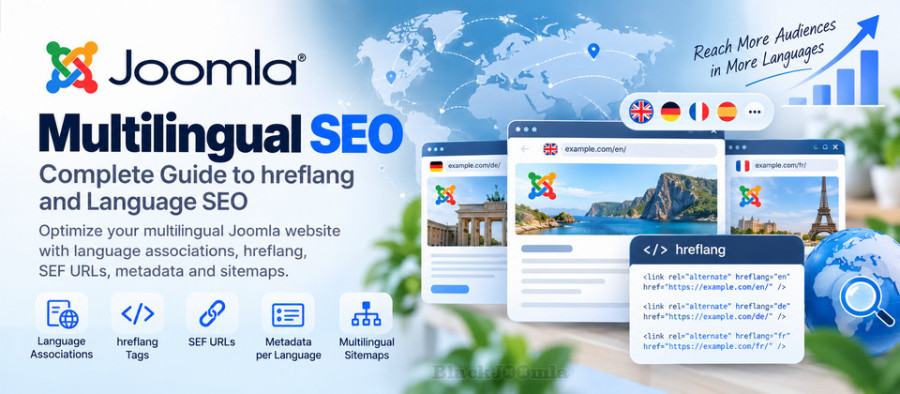
hreflang is an HTML attribute used to indicate alternative versions of a page for different languages or regional audiences.
A simplified example looks like this:
<link rel="alternate"
hreflang="en"
href="https://example.com/en/article.html">

<link rel="alternate"
hreflang="de"
href="https://example.com/de/article.html">

<link rel="alternate"
hreflang="fr"
href="https://example.com/fr/article.html">
The language code tells search engines which language the alternative page targets.
Language Codes in hreflang
Common language codes include:
| Language | hreflang |
|---|---|
| English | en |
| German | de |
| French | fr |
| Spanish | es |
| Italian | it |
| Turkish | tr |
| Persian | fa |
Regional targeting can also be specified using a language-region combination.
For example:
en-US
en-GB
de-DE
fr-FR
Use regional codes only when you actually have separate regional versions of the content.
Language Targeting vs Country Targeting
A common multilingual SEO mistake is assuming that every language needs a country code.
If you have one English version intended for English-speaking users generally, you can use:
hreflang="en"
If you have separate English versions specifically targeting the United States and United Kingdom, you could use:
hreflang="en-US"
hreflang="en-GB"
The regional code should represent an actual targeting distinction rather than being added simply because a country exists.
How to Configure Multilingual SEO in Joomla
A practical multilingual Joomla SEO implementation normally involves several stages.
Step 1: Install the Required Languages
Install the languages that your website actually needs.
Do not install dozens of languages simply because Joomla supports them. Each additional language increases the amount of content, navigation, metadata, and maintenance that you need to manage.
Step 2: Create Language-Specific Content
Create the appropriate version of each article or K2 Item for each language.
Do not rely on automatic browser translation as a substitute for properly managed multilingual content.
Step 3: Create Language Associations
Connect equivalent content across languages using Joomla's language association functionality where applicable.
This helps Joomla understand which pages represent the corresponding versions of each other.
Step 4: Configure Language-Specific Menus
Multilingual Joomla websites commonly use separate menu structures for different languages.
For example:
Main Menu - English
Main Menu - German
Main Menu - French
Each menu should contain the appropriate language version of the site's pages.
Step 5: Configure the Language Switcher
A language switcher allows visitors to move between available language versions.
Make sure that the language switcher points to the corresponding version of the current page whenever an association exists, rather than always sending visitors to the homepage.
Joomla Language Switcher and SEO
The language switcher is primarily a user-navigation feature, but it also plays an important role in the overall multilingual architecture of the website.
A good language switcher should make it easy for users to move between equivalent language versions.
For example:
English | Deutsch | Français | Türkçe
When a visitor is reading an article in English, selecting German should ideally open the German version of the same article rather than a generic German homepage.
Multilingual SEF URLs
Clean URLs are particularly useful on multilingual websites because they make the language structure easier to understand.
A multilingual Joomla website might use language-specific URL paths such as:
/en/joomla-seo.html
/de/joomla-seo.html
/fr/joomla-seo.html
Another website may use separate domains or subdomains. There is no single URL structure that is required for every multilingual website.
The important point is to maintain a consistent and logical architecture.
If you are configuring Joomla SEF URLs, see:
How to Configure SEF URLs in Joomla: Complete Guide
Multilingual Metadata
Each language version should have metadata appropriate to that language.
For example, an English page should not simply use the exact English title and meta description on a German page.
Consider optimizing:
- Page title
- Meta description
- Heading structure
- Image alt text
- Open Graph information
- Structured data where applicable
Translated metadata should also be written naturally for the target audience instead of being mechanically translated word by word.
Multilingual Canonical URLs
Canonical URLs are particularly important when managing multiple versions of content.
Each language version will normally have its own canonical URL when it represents a distinct localized page.
For example:
English page:
https://example.com/en/article.html

German page:
https://example.com/de/article.html

French page:
https://example.com/fr/article.html
The English page should not automatically canonicalize to the German page simply because the content is equivalent.
Each localized page should normally identify its own preferred URL when the pages are legitimate language alternatives.
For more information about canonical URLs and duplicate content, see:
How to Fix Duplicate Content in Joomla: Canonical URLs & SEO
hreflang and Canonical URLs Are Not the Same
This distinction is important.
The canonical URL tells search engines which URL is the preferred representative of a page or group of duplicate or substantially similar URLs.
The hreflang relationship indicates alternative language or regional versions.
They can work together.
For example:
English page
Canonical → English URL
hreflang → German URL
hreflang → French URL

German page
Canonical → German URL
hreflang → English URL
hreflang → French URL

French page
Canonical → French URL
hreflang → English URL
hreflang → German URL
Do not use canonical tags as a replacement for hreflang signals.
Multilingual XML Sitemaps
An XML sitemap can help search engines discover important URLs on a multilingual Joomla website.
Make sure that the sitemap contains the canonical URLs that you want search engines to discover and crawl.
If your website has separate language versions, make sure the important localized URLs are represented appropriately according to the sitemap system you use.
Learn more:
How to Create an XML Sitemap in Joomla: Complete Guide
A sitemap helps with URL discovery, but it does not guarantee that every URL will be indexed.
Joomla Multilingual SEO and Google Indexing
Every important language version should be accessible to search engine crawlers.
Check that your multilingual pages are not accidentally blocked by:
- robots.txt
- Noindex directives
- Incorrect canonical URLs
- Authentication requirements
- Broken redirects
- Server errors
- Incorrect menu configuration
If a language version cannot be crawled or indexed, its hreflang relationship cannot compensate for the underlying technical problem.
For indexing troubleshooting, see:
How to Get Joomla Pages Indexed by Google: Complete Guide
Joomla Multilingual SEO and robots.txt
Review robots.txt carefully when launching additional language versions.
A rule that unintentionally blocks a language directory can prevent crawlers from accessing important localized content.
For example, if your German content is located under:
/de/
make sure your robots.txt configuration does not accidentally block that directory.
Learn more about robots.txt:
How to Configure Robots.txt in Joomla: Complete SEO Guide
Joomla Multilingual SEO with K2
If your Joomla website uses K2, multilingual SEO requires additional attention to the relationship between K2 Items, categories, menus, and language versions.
A multilingual K2 website may contain separate content versions for each language. The exact implementation depends on the K2 version, Joomla version, template, language configuration, and extensions installed on the website.
When working with K2, check:
- K2 Item language assignments
- Category language assignments
- Menu Item language assignments
- Language associations where supported
- SEF URLs
- Canonical URLs
- Language switcher behavior
- Metadata
- XML sitemap URLs
Do not assume that a multilingual configuration that works correctly for standard Joomla Articles will automatically behave identically for K2 Items.
Multilingual K2 URL Structure
When using K2, test the actual public URL generated for each language version.
For example:
English K2 Item:
https://example.com/en/blog/joomla-seo.html

German K2 Item:
https://example.com/de/blog/joomla-seo.html
Check that each URL loads the intended language version and does not redirect unexpectedly to another language.
Common hreflang Mistakes
1. Using the Wrong Language Code
Make sure the language identifier accurately represents the intended language.
2. Linking to Non-Existent URLs
Every hreflang URL should point to a real, accessible page.
3. Using Different URL Versions Inconsistently
Do not use an HTTP URL in one hreflang declaration and an HTTPS URL as the canonical version of the same page without a clear reason.
Use the preferred final URLs consistently.
4. Forgetting Return References
Language alternatives should be configured consistently across the corresponding pages. If the English page references a German alternative, review the German page's corresponding alternate references as well.
5. Using hreflang for Unrelated Pages
Hreflang should connect genuine language or regional alternatives rather than unrelated pages.
6. Canonicalizing All Languages to One Language
Do not automatically canonicalize every language version to the English page merely because English is the primary language of the website.
If the localized pages are legitimate separate versions, they normally need their own preferred URLs.
7. Blocking Language Pages
A hreflang declaration does not make a blocked or inaccessible URL useful for search engines.
Duplicate Content in Multilingual Joomla Websites
Having translated versions of the same content does not automatically mean that the pages should all be treated as one URL.
The important question is whether the pages represent legitimate localized versions intended for different language audiences.
Problems can arise when the same language is available through multiple unnecessary URLs.
For example:
/en/article.html
/article.html
/component/content/article/article.html
/index.php/article.html
If these URLs represent the same content, your URL structure and canonicalization should be reviewed.
Multilingual SEO and 301 Redirects
When changing the URL structure of a multilingual Joomla website, old URLs may need appropriate redirects.
For example, if a language directory changes from:
/en/old-article.html
to:
/en/new-article.html
the old URL should be handled appropriately rather than simply abandoned.
Learn more about Joomla redirects:
How to Create 301 Redirects in Joomla: Complete Guide
Language Switcher Does Not Replace hreflang
A visible language switcher and hreflang are different mechanisms.
The language switcher is primarily designed for visitors. Hreflang provides a machine-readable relationship between alternate language or regional pages.
A multilingual website can benefit from both.
How to Test Joomla hreflang
After configuring multilingual SEO, inspect the generated HTML of representative pages.
Look for alternate language declarations such as:
<link rel="alternate" hreflang="en"
href="https://example.com/en/article.html">

<link rel="alternate" hreflang="de"
href="https://example.com/de/article.html">
Then verify:
- The URLs exist.
- The URLs are accessible.
- The pages contain the intended language.
- The URLs are not accidentally redirected.
- The canonical URL is appropriate.
- The language switcher points to the correct alternative.
- The pages are not blocked from crawling.
- The sitemap contains the appropriate canonical URLs.
Use Google Search Console to Monitor Multilingual Pages
Google Search Console can help you investigate indexing and search performance for your multilingual website.
Review individual language URLs when diagnosing problems rather than assuming that all language versions have the same technical status.
Pay attention to:
- Indexed pages
- Excluded pages
- Canonical selection
- Crawl issues
- Search queries
- Impressions
- Clicks
- Average position
If one language version performs or indexes differently from another, investigate that language's URLs and configuration separately.
Multilingual SEO and Structured Data
If your Joomla website uses structured data, make sure the structured data corresponds to the language and content of the page.
For example, an Article page in German should not contain structured data describing unrelated English content.
Structured data should accurately represent the visible content of the individual page.
Learn more about Joomla Schema markup:
How to Add Schema Markup to Joomla: Complete Guide
Multilingual SEO and Internal Linking
Internal linking should generally keep users within the appropriate language version of the website when a relevant localized page exists.
For example, an English article should normally link to relevant English content, while the German version should link to relevant German content.
This creates a clearer navigation structure for both users and search engines.
For a broader internal linking strategy, see:
Joomla Internal Linking: Complete SEO Guide
Multilingual Joomla SEO Checklist
- Install only the languages your website actually needs.
- Create dedicated content for each target language.
- Configure language associations correctly.
- Configure language-specific menu structures.
- Use a language switcher.
- Make sure language alternatives point to the correct pages.
- Use clean and consistent SEF URLs.
- Optimize titles and meta descriptions for each language.
- Use appropriate canonical URLs.
- Configure hreflang correctly where applicable.
- Check that alternate URLs are accessible.
- Do not block important language directories in robots.txt.
- Check noindex directives.
- Include important canonical URLs in your XML sitemap.
- Check K2 language assignments if your site uses K2.
- Test the language switcher on individual content pages.
- Check redirects after URL changes.
- Review indexing in Google Search Console.
- Check internal links between localized content.
- Monitor each major language version independently.
Frequently Asked Questions
Does Joomla support multilingual websites?
Yes. Joomla includes built-in multilingual functionality that can be used to create websites with multiple languages, including language filters, language associations, and language switchers.
What is hreflang in Joomla?
Hreflang is a signal used to indicate alternative language or regional versions of a page. Joomla's multilingual configuration can help establish relationships between language versions, while the final implementation should be checked on the rendered pages.
Do I need hreflang if I use Joomla language associations?
Language associations and hreflang serve related but different purposes. Associations connect corresponding content within the Joomla multilingual structure, while hreflang provides search engines with language and regional alternative signals. Check the actual HTML generated by your Joomla configuration and extensions.
Should each language version have its own canonical URL?
When localized pages are legitimate separate versions for different language audiences, each version will normally have its own preferred URL. Do not automatically canonicalize all language versions to a single language.
Can I use Joomla multilingual SEO with K2?
Yes, but K2 requires additional testing because its content, category, menu, URL, and template behavior can differ from standard Joomla Articles. Check the actual generated URLs, language assignments, canonical tags, and language switching behavior.
Should I use country codes for every language?
No. Use language-region combinations when you actually have separate regional versions. A general English version can use en, while separate United States and United Kingdom versions may use en-US and en-GB.
Does hreflang improve rankings?
Hreflang does not guarantee higher rankings. Its purpose is to help search engines understand which language or regional version of a page is appropriate for a particular audience.
Can robots.txt block multilingual SEO?
Yes. If important language versions are blocked from crawling, search engines may have difficulty accessing those pages and processing their content and related signals.
Final Thoughts
Multilingual SEO on Joomla requires more than translating articles. Your language structure, URLs, menus, metadata, canonical URLs, internal links, sitemaps, and language relationships should work together as one consistent architecture.
For Joomla websites using K2, pay particular attention to how language assignments, categories, menu items, URLs, and templates interact. Always test the final public URLs rather than assuming that a configuration screen alone guarantees the desired SEO output.
A properly structured multilingual Joomla website makes it easier for visitors to find the correct language version and gives search engines clearer information about the relationship between localized pages.