If you are currently working on your Joomla URL structure, you may also want to read our guide on how to configure SEF URLs in Joomla.
What Is an XML Sitemap?
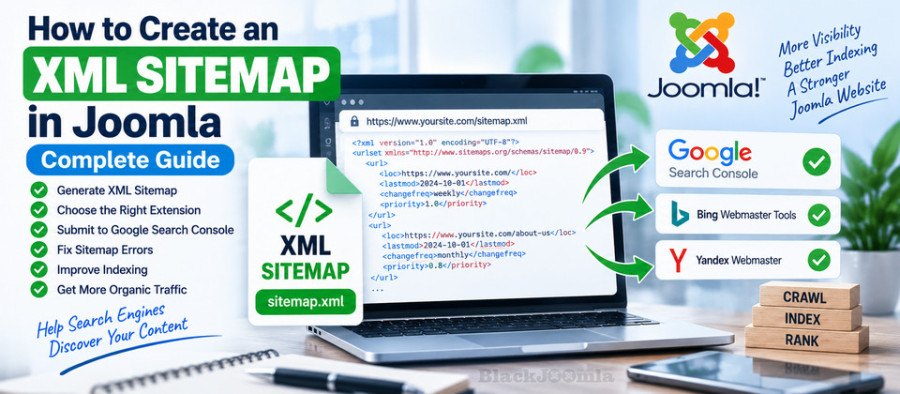
An XML sitemap is a file that provides search engines with information about the URLs that are available on your website.
A basic sitemap may contain URLs such as:
https://example.com/
https://example.com/about-us
https://example.com/services
https://example.com/blog
https://example.com/contact-us
The sitemap gives search engine crawlers a structured list of URLs that they can discover and crawl.
For a dynamic Joomla website, manually maintaining an XML sitemap would quickly become impractical because new articles, categories, menu items, products, and other content can be added or changed regularly.
For this reason, Joomla websites commonly use sitemap extensions that generate and update XML sitemaps automatically. Joomla's current documentation also points to sitemap extensions as a practical solution for dynamically generated websites. :contentReference[oaicite:1]{index=1}
Why Does a Joomla Website Need an XML Sitemap?
Search engines can discover many pages by following links between pages. However, a sitemap provides an additional structured source of URLs.
A sitemap can be particularly useful for:
- Large Joomla websites.
- Websites with many articles.
- Websites with complex navigation.
- New websites with few external links.
- Websites with frequently updated content.
- Websites that have recently migrated to Joomla.
- Websites with content that is not easily accessible through the main menu.
For a website such as an online store, directory, news website, or large content portal, maintaining an accurate sitemap can become especially important.
Does a Sitemap Guarantee Google Indexing?
No.
This is an important distinction.
An XML sitemap helps search engines discover URLs, but submitting a URL in a sitemap does not guarantee that the URL will be crawled or indexed.
Joomla's documentation also describes XML sitemaps as a way to provide information and hints to search engine crawlers rather than a guarantee of indexing. :contentReference[oaicite:2]{index=2}
If an important page is blocked by robots.txt, marked noindex, inaccessible, duplicated, or otherwise unsuitable for indexing, simply adding it to a sitemap will not solve the underlying problem.
What Should a Joomla XML Sitemap Contain?
A good sitemap should primarily contain the URLs that you actually want search engines to discover and potentially index.
For example, your sitemap may include:
- Important Joomla articles.
- Important category pages.
- Core website pages.
- Product pages.
- Important landing pages.
- Other canonical URLs that should be discoverable.
It should generally not be used as a dumping ground for every URL generated by your website.
Which URLs Should Not Be in a Sitemap?
As a general rule, avoid including URLs that you do not want search engines to treat as important indexable pages.
Depending on your website, this may include:
- Duplicate URLs.
- Redirected URLs.
- 404 pages.
- Administrative pages.
- Internal search results.
- Temporary URLs.
- URLs blocked from crawling.
- Pages marked with
noindex.
Your sitemap should represent your preferred, canonical content rather than every URL that happens to exist.
How to Create an XML Sitemap in Joomla
Joomla does not require you to manually write an XML file for a dynamic website. The most practical approach is to use a sitemap extension that can automatically generate the sitemap from your Joomla content.
The general process is:
- Choose a Joomla sitemap extension.
- Install and configure the extension.
- Select the content that should appear in the sitemap.
- Generate the XML sitemap.
- Open the sitemap URL in your browser.
- Check that the URLs are correct.
- Submit the sitemap to Google Search Console.
- Monitor the sitemap and indexing reports.
How to Choose a Joomla Sitemap Extension
There are several Joomla sitemap extensions available. When choosing one, consider the size and complexity of your website rather than simply choosing the extension with the longest feature list.
Useful features can include:
- Automatic XML sitemap generation.
- Support for Joomla articles and categories.
- Support for third-party extensions.
- Image sitemap support.
- Multilingual sitemap support.
- HTML sitemap generation.
- Sitemap index support.
- Control over which URLs are included.
- Automatic sitemap updates.
- Compatibility with current Joomla versions.
Popular Joomla Sitemap Extensions
Several established sitemap extensions are available for Joomla.
JSitemap
JSitemap is a comprehensive sitemap and indexing extension with support for multiple sitemap types and advanced SEO-related functionality.
The current Joomla Extensions Directory listing shows JSitemap compatible with Joomla 3, 4, 5, and 6. It supports XML and HTML sitemaps as well as specialized sitemap formats. :contentReference[oaicite:3]{index=3}
OSMap
OSMap is another established Joomla sitemap generator.
Its current JED listing shows support for Joomla 3 through Joomla 6 and includes XML, HTML, and image sitemap functionality in the free version. :contentReference[oaicite:4]{index=4}
Aimy Sitemap PRO
Aimy Sitemap PRO is another option for Joomla websites that need an automatically generated XML sitemap and additional sitemap configuration options.
Before installing a sitemap extension, compare its functionality with your existing SEO extensions. Some all-in-one SEO extensions may already generate or manage sitemaps.
Do You Need More Than One Sitemap Extension?
Usually, no.
Installing multiple extensions that generate competing XML sitemaps can create unnecessary complexity.
For example, if one extension generates:
https://example.com/sitemap.xml
and another extension is configured to generate another sitemap for the same content, you may end up with duplicated sitemap management and confusion about which sitemap should be submitted to search engines.
Choose one primary sitemap solution and configure it carefully.
How to Find Your Joomla Sitemap URL
After configuring your sitemap extension, locate the generated XML sitemap URL.
Depending on the extension and configuration, it may look similar to:
https://example.com/sitemap.xml
or:
https://example.com/index.php?option=...
A well-configured Joomla sitemap extension will normally provide the exact URL you should use.
Do not assume that every Joomla website uses exactly the same sitemap filename or path.
How to Check a Joomla XML Sitemap
Open the sitemap URL directly in your browser.
You should receive a valid XML document or a sitemap interface that correctly exposes the XML sitemap.
Check several URLs from the sitemap manually.
For example:
- Does the URL open?
- Does it return the correct page?
- Is it the preferred canonical URL?
- Does it avoid unnecessary redirects?
- Does it avoid 404 errors?
- Is the page actually intended to be indexed?
A sitemap can technically be valid while still containing poor-quality URLs, so validation should include both the XML format and the URLs themselves.
How to Submit a Joomla Sitemap to Google Search Console
Once your sitemap is working, you can submit it through Google Search Console.
- Open Google Search Console.
- Select the correct website property.
- Open the Sitemaps report.
- Enter the sitemap path or URL.
- Submit the sitemap.
- Monitor the reported status.
Google recommends using Search Console to monitor sitemap submissions and indexing information. :contentReference[oaicite:5]{index=5}
Submitting a sitemap does not mean every URL will immediately be indexed. Google still evaluates each URL independently.
Should You Add the Sitemap to robots.txt?
Yes, this can be useful.
The sitemap directive in robots.txt can point crawlers to your sitemap using its absolute URL.
For example:
User-agent: *
Disallow:

Sitemap: https://example.com/sitemap.xml
Google documents support for the sitemap field in robots.txt, and the sitemap URL should be a fully qualified URL. :contentReference[oaicite:6]{index=6}
This is complementary to submitting the sitemap through Search Console; you do not have to choose only one method.
XML Sitemap vs HTML Sitemap
These two types of sitemap serve different purposes.
| Type | Main Purpose |
|---|---|
| XML Sitemap | Helps search engines discover website URLs |
| HTML Sitemap | Provides a human-readable overview of website content |
An HTML sitemap can be useful for visitors and website navigation, while the XML sitemap is primarily intended for crawlers.
Some Joomla sitemap extensions can generate both types.
Should You Include Every Joomla Article?
Not necessarily.
The sitemap should contain the URLs that represent valuable, canonical content that you want search engines to discover.
If an article is outdated, duplicate, thin, intentionally excluded from indexing, or otherwise not part of your SEO strategy, adding it to the sitemap may not be useful.
Review the sitemap as part of your broader content and indexing strategy.
Joomla Sitemap and Canonical URLs
Your sitemap should preferably contain the canonical version of each important URL.
For example, if multiple URLs can access essentially the same content, identify the preferred URL and use that version in the sitemap.
Do not use a sitemap as a substitute for canonicalization.
If your website has duplicate URLs, solve the duplication problem using appropriate URL, canonical, redirect, or routing configuration.
Joomla Sitemap and 404 Errors
Your sitemap should not contain URLs that return 404 responses.
If you discover a 404 URL in your sitemap:
- Check whether the page should still exist.
- Restore the page if it was removed accidentally.
- Update the sitemap configuration if the page should no longer be included.
- Create a relevant 301 redirect if the page has been permanently replaced.
- Remove the obsolete URL from the sitemap.
For a detailed explanation of 404 problems, read How to Fix 404 Errors in Joomla.
Joomla Sitemap and 301 Redirects
Redirected URLs should generally not be the URLs you submit in your sitemap.
Instead of:
/old-page.html → 301 → /new-page.html
the sitemap should normally contain the final URL:
/new-page.html
This keeps the sitemap cleaner and reduces unnecessary crawling steps.
If you are restructuring your Joomla URLs, see our guide on how to create 301 redirects in Joomla.
Joomla Sitemap and SEF URLs
Your sitemap should use the URL structure you actually want search engines to discover.
If your Joomla website uses SEF URLs such as:
https://example.com/joomla-seo-guide
your sitemap should contain those preferred URLs rather than obsolete or non-preferred URL variants.
For more information about Joomla SEF configuration, read How to Configure SEF URLs in Joomla.
What About Sitemap lastmod?
XML sitemaps can include a lastmod value indicating when a URL was last significantly updated.
If your sitemap generator provides this field, the date should reflect a real update to the content rather than being changed automatically without a meaningful content change.
Accurate modification dates can help search engines understand which URLs have actually changed.
Common Joomla Sitemap Problems
1. Sitemap Returns a 404 Error
Check the sitemap extension configuration, menu items, routing, and the generated sitemap URL.
2. Sitemap Contains 404 URLs
Remove obsolete URLs from the sitemap and investigate why the sitemap generator is still including them.
3. Sitemap Contains Redirected URLs
Configure the sitemap to output the final destination URLs instead of URLs that redirect elsewhere.
4. Google Reports Sitemap Errors
Open the sitemap directly and verify that it is accessible, valid, and contains correctly formatted URLs.
5. Sitemap Is Too Large
Large websites may need multiple sitemap files and a sitemap index. A capable sitemap extension can usually manage this automatically.
6. New Articles Are Not Appearing
Check whether the article is published, accessible, included by the sitemap extension's configuration, and eligible to be included in the sitemap.
7. Sitemap Contains Non-Canonical URLs
Review your URL configuration and canonical settings, then make sure the sitemap outputs your preferred URL versions.
How Often Should a Joomla Sitemap Be Updated?
A dynamic Joomla sitemap should update when relevant website content changes.
You normally do not need to manually regenerate a sitemap after every article update if your sitemap extension automatically rebuilds or updates its data.
Modern search engines also determine their own crawling schedules. Joomla's documentation notes that search engines generally adjust their revisit frequency based on how frequently pages change, so manually specifying a change frequency is not a guarantee of more frequent crawling. :contentReference[oaicite:7]{index=7}
Can a Sitemap Improve SEO Rankings?
A sitemap is primarily a discovery and crawling aid. It does not directly guarantee higher rankings.
Its main SEO value is helping search engines discover the URLs that matter on your website and understand the available URL set.
Ranking still depends on many other factors, including content quality, relevance, technical accessibility, internal linking, page experience, and overall site quality.
For a broader Joomla SEO strategy, see our guide to the best Joomla SEO extensions.
Joomla XML Sitemap Checklist
- Choose one primary sitemap solution.
- Generate an XML sitemap automatically.
- Include important canonical URLs.
- Exclude unnecessary or non-indexable URLs.
- Remove 404 URLs.
- Avoid submitting redirected URLs.
- Check the sitemap manually after configuration.
- Submit the sitemap to Google Search Console.
- Add the sitemap URL to robots.txt when appropriate.
- Monitor sitemap errors.
- Review the sitemap after major website changes.
Frequently Asked Questions
Does Joomla have an XML sitemap?
Joomla websites can use sitemap extensions to dynamically generate XML sitemaps. Joomla's documentation recommends sitemap extensions for dynamic websites because manually maintaining XML files is impractical as content changes. :contentReference[oaicite:8]{index=8}
What is the best sitemap extension for Joomla?
There is no single best extension for every Joomla website. JSitemap, OSMap, and Aimy Sitemap PRO are among the established options. Your choice should depend on your site's size, extensions, sitemap requirements, and Joomla version.
How do I submit a Joomla sitemap to Google?
Generate your sitemap, identify its URL, then submit it through the Sitemaps section of Google Search Console.
Should I put sitemap.xml in robots.txt?
You can add a fully qualified sitemap URL using the Sitemap: directive in robots.txt. This provides crawlers with another way to discover the sitemap. :contentReference[oaicite:9]{index=9}
Should 404 pages be included in a Joomla sitemap?
No. A sitemap should contain valid URLs that you want search engines to discover, not URLs that return 404 errors.
Should redirected URLs be included in a sitemap?
Normally no. The sitemap should contain the final preferred URL rather than an old URL that redirects to another page.
Does an XML sitemap guarantee indexing?
No. A sitemap helps search engines discover URLs, but it does not guarantee that those URLs will be crawled or indexed.
Final Thoughts
A properly configured XML sitemap is a simple but important part of technical SEO for a Joomla website.
For small websites, a basic sitemap may be enough. Larger Joomla websites can benefit from more advanced sitemap management, especially when they contain thousands of articles, products, categories, images, multilingual content, or third-party extensions.
The most important principle is to keep your sitemap clean and useful: include the important canonical URLs you want search engines to discover, remove broken or obsolete URLs, and monitor the sitemap after major changes.
Once your sitemap is working correctly, combine it with a stable SEF URL structure, proper redirects, good internal linking, and a broader Joomla SEO strategy.