Why Joomla Website Security Matters
Joomla is a powerful content management system used for websites ranging from small blogs to large business and organizational platforms. Like any public-facing web application, a Joomla website can be exposed to automated attacks, vulnerable extensions, stolen credentials, server vulnerabilities, and configuration mistakes.
Security is therefore not a single setting. It is an ongoing process that involves the Joomla core, third-party extensions, templates, hosting environment, user accounts, database, server configuration, and backup strategy.
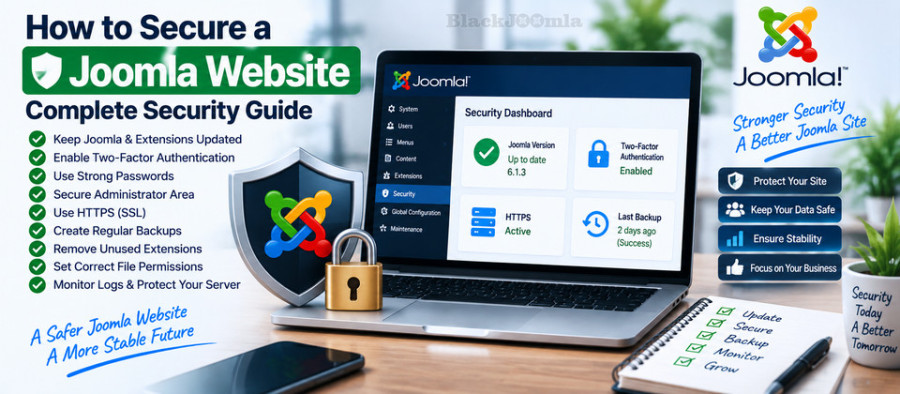
Joomla Security Checklist
Before going into individual security measures, use this checklist as a starting point:
- Keep Joomla updated.
- Keep third-party extensions and templates updated.
- Remove unused extensions and templates.
- Enable Multi-factor Authentication.
- Use strong, unique administrator passwords.
- Limit administrator accounts and privileges.
- Use HTTPS across the website.
- Maintain tested off-site backups.
- Use a reputable hosting provider.
- Review file and directory permissions.
- Monitor logs and suspicious activity.
- Check Joomla's Vulnerable Extensions information.
- Protect sensitive administrator and server resources.
- Keep PHP and other server software supported and updated.
1. Keep Joomla Updated
One of the most important Joomla security practices is keeping the Joomla core updated.
Security vulnerabilities can be discovered after a Joomla version has been released. Security releases provide fixes that should be applied promptly rather than postponed indefinitely.
Joomla's current documentation recommends keeping the website and its code up to date, and Joomla provides an administrator update system for supported versions.
For example, Joomla 6.1.3 and Joomla 5.4.8 were released on August 18, 2026 as security and bugfix releases. The Joomla project also published several security fixes in the 6.1.x and 5.4.x series during 2026.
Always check the current Joomla release information before performing an update rather than relying on an old version number in an article.
2. Keep Joomla Extensions Updated
Third-party extensions are an important part of the Joomla ecosystem, but they also introduce additional software that must be maintained.
Joomla's documentation specifically recommends checking vulnerable extensions and keeping third-party software updated.
Before installing an extension, check:
- Whether it is actively maintained.
- Whether it supports your Joomla version.
- Whether security updates are published regularly.
- Whether the developer provides documentation and support.
- Whether the extension is available from a trusted source.
- Whether the extension is actually necessary for your website.
Joomla maintains information about vulnerable third-party extensions, and its current documentation notes that extensions can become vulnerable as technical requirements and security practices evolve.
3. Remove Unused Joomla Extensions
An extension that is installed but no longer used still adds software to your website.
Do not assume that unpublishing an extension completely removes its security risk. Joomla's documentation specifically warns that simply removing a menu link or unpublishing a module is not sufficient if vulnerable extension files remain on the server.
When an extension is no longer needed, uninstall it properly and verify that its files have been removed.
This is particularly important for old components, plugins, modules, templates, and packages left behind after previous website projects.
4. Enable Multi-Factor Authentication
Multi-factor Authentication (MFA) adds another authentication layer after the initial login.
Joomla's current MFA system supports multiple methods, including authenticator-generated verification codes, WebAuthn, YubiKey, email verification codes, and other authentication mechanisms depending on the enabled plugins.
For administrator accounts, MFA is one of the most useful security controls you can enable.
Joomla also supports WebAuthn-based authentication. The current Joomla documentation describes WebAuthn as a strong authentication mechanism based on public-key cryptography and supported by modern browsers and devices.
Why MFA Matters
A password can be stolen, guessed, reused, or exposed through phishing.
With MFA enabled, obtaining the password alone is not necessarily enough to complete the authentication process.
For sensitive administrator accounts, use MFA whenever practical and make sure backup authentication methods or recovery codes are stored securely.
5. Use Strong Administrator Passwords
Administrator accounts should use unique passwords that are not reused on other websites.
A strong password should not contain easily predictable information such as:
- Company names
- Website names
- Domain names
- Common dictionary words
- Birth dates
- Simple number sequences
Using a reputable password manager can make it easier to create and maintain unique passwords for Joomla administrator accounts.
6. Limit Joomla Administrator Accounts
Do not give every website user administrator-level privileges.
Use Joomla's access-control system to provide users with only the permissions they actually need.
For example, an editor who only needs to manage articles should not automatically receive full Super User privileges.
Reducing unnecessary privileges limits the potential impact of a compromised account.
7. Secure the Joomla Administrator Area
The Joomla administrator area is a sensitive part of the website.
Depending on your hosting environment and operational requirements, additional restrictions may be possible at the server or network level.
Examples include:
- IP allowlisting where appropriate
- VPN access
- Web server authentication
- Web Application Firewall rules
- Strong MFA requirements
- Monitoring administrator login attempts
Do not rely on changing the administrator URL alone as a complete security strategy. Authentication, authorization, updates, and server controls remain important.
8. Use HTTPS
HTTPS encrypts communication between the visitor's browser and your web server.
It is especially important for Joomla websites with administrator logins, user accounts, forms, eCommerce functionality, or other sensitive information.
After enabling HTTPS, verify that:
- All important pages load through HTTPS.
- HTTP requests redirect correctly where appropriate.
- Images and scripts do not create mixed-content problems.
- Canonical URLs use the intended protocol.
- Internal links use the preferred HTTPS URLs.
- Third-party integrations continue to work correctly.
HTTPS should be considered part of your overall website security configuration, not simply an SEO setting.
9. Create Reliable Joomla Backups
A backup is one of the most important recovery mechanisms for a Joomla website.
However, having a backup is not enough. You need a backup that can actually be restored.
A reliable backup strategy should include:
- Joomla files
- Database
- Configuration information
- Important media files
- Templates and custom code
- Extension data where required
Joomla's security documentation recommends a strong off-site backup and recovery process and emphasizes testing the recovery process before it is needed.
Do Not Keep the Only Backup on the Same Server
If the server fails or the website is compromised, a backup stored on the same server may be unavailable or compromised as well.
Maintain copies in a separate storage location.
If you want automated backups, see our earlier guide:
How to Backup a Joomla Site to Google Drive Automatically
10. Test Your Joomla Backups
A backup that has never been restored should not automatically be considered reliable.
Periodically test whether you can restore the website and database successfully.
A practical recovery test should verify:
- Files can be restored.
- The database can be restored.
- The Joomla configuration works.
- Extensions operate correctly.
- Media files are available.
- Users can log in.
- The website can be brought back online.
11. Use Secure Hosting
Joomla security does not stop at the CMS.
Your hosting environment is part of the security boundary.
When choosing hosting, consider:
- Supported PHP versions
- Operating system updates
- Web server security
- Database security
- Account isolation
- Backup options
- SSL/TLS support
- Firewall and malware detection
- Access to server logs
- Security response procedures
Joomla's security documentation identifies the hosting environment as a critical part of website security and recommends keeping server-side software updated.
12. Review File and Directory Permissions
Incorrect file permissions can create unnecessary security risks.
Do not automatically give Joomla files or directories maximum write permissions simply because an extension installation or server configuration requires them.
Permissions depend on the server's PHP execution model and hosting configuration, so there is no single numeric permission value that is correct for every Joomla installation.
For example, Joomla's older security documentation discusses common permission configurations such as 644 for files and 755 for directories in certain hosting environments, but permissions should always be configured according to the actual server setup.
If your hosting provider requires extremely permissive permissions such as 777 for normal Joomla operation, investigate why before accepting that configuration as normal.
13. Protect configuration.php
The Joomla configuration.php file contains important configuration information and should be protected by the server and filesystem configuration.
Do not expose configuration files through the web server.
After changing server configuration or migrating a website, verify that sensitive files cannot be downloaded directly through HTTP.
14. Monitor Joomla Logs
Security is not only about preventing attacks. Monitoring can also help you identify suspicious activity.
Depending on your hosting environment, useful sources can include:
- Joomla logs
- Web server access logs
- Error logs
- Firewall logs
- Authentication logs
- Hosting security reports
Look for unusual patterns such as repeated failed authentication attempts, unexpected requests to sensitive files, unusual POST requests, or sudden changes in traffic.
15. Use a Web Application Firewall
A Web Application Firewall (WAF) can provide an additional layer between the public internet and your Joomla website.
Depending on the implementation, a WAF can help detect or block certain malicious HTTP requests and common attack patterns.
However, a WAF should not be treated as a replacement for Joomla updates, secure authentication, backups, or vulnerable-extension management.
16. Check Joomla Vulnerable Extensions
Third-party extensions are an important part of Joomla security management.
Joomla maintains a Vulnerable Extensions List to provide information about known vulnerable extensions.
Before installing an unfamiliar extension, research its current status and compatibility.
If an extension is known to be vulnerable, do not assume that hiding its menu item or disabling a module makes the underlying vulnerability disappear.
Joomla's documentation explains that vulnerable extension files can remain directly accessible even when the extension is no longer visible through normal site navigation.
17. Remove Old Joomla Files
Old backup archives, temporary files, previous installation packages, unused scripts, and forgotten development files can create unnecessary exposure.
After completing a migration or development project, review the Joomla root directory and remove files that are no longer required.
Do not delete Joomla core files simply because their names look unfamiliar. Verify what each file belongs to before removing it.
18. Keep PHP and Server Software Updated
Joomla runs within a larger software environment that can include PHP, a database server, a web server, operating-system packages, and other services.
Keeping Joomla updated while running unsupported or obsolete server software does not provide a complete security strategy.
Work with your hosting provider or server administrator to keep supported server components patched.
19. Be Careful with Joomla Extensions from Untrusted Sources
Download extensions from sources you trust and verify that the package corresponds to the developer's official release.
Be especially careful with:
- Modified commercial extensions
- Unknown download sites
- Extensions distributed without a clear developer identity
- Old packages found on file-sharing websites
- Extensions with no maintenance history
Security problems can be introduced before an extension is even installed on your website.
20. Secure Your Development and Staging Sites
A forgotten staging website can become a security problem.
Development and staging environments may contain:
- Old Joomla versions
- Development extensions
- Test accounts
- Debugging tools
- Database copies
- Temporary files
If a staging site is publicly accessible, secure it with appropriate authentication or network restrictions and keep it updated.
Joomla Security and SEO
Security and SEO are separate disciplines, but technical problems can affect both.
A compromised website can experience:
- Unauthorized content changes
- Spam pages
- Malicious redirects
- Injected links
- Unexpected JavaScript
- Server errors
- Indexing problems
This is one reason technical SEO and security should be managed together rather than treated as completely independent projects.
For more technical SEO information, see our guide to the best Joomla SEO extensions.
What to Do If Your Joomla Website Is Hacked
If you suspect that your Joomla website has been compromised, do not immediately assume that reinstalling one extension or changing one password has solved the problem.
A compromised website requires a systematic investigation.
Step 1: Restrict Access
If necessary, temporarily take the website offline or restrict access while investigating the incident.
Step 2: Preserve Evidence
Keep relevant logs and copies of suspicious files where possible. This can help identify how the compromise occurred.
Step 3: Change Credentials
Change affected Joomla administrator passwords and other credentials that may have been exposed.
Depending on the incident, this can include hosting, FTP/SFTP, database, control-panel, and other administrative credentials.
Step 4: Identify Vulnerable Software
Check Joomla, extensions, templates, PHP, and server software for outdated or vulnerable components.
Step 5: Do Not Automatically Restore a Compromised Backup
A backup created after an attacker gained access may contain malicious files or altered code.
Joomla's security documentation specifically warns that backups should not automatically be treated as safe sources for restoring a compromised website.
Step 6: Rebuild from Clean Sources When Necessary
Depending on the severity of the compromise, rebuilding the Joomla core and extensions from known-clean sources may be safer than attempting to identify every malicious modification individually.
Joomla Security Checklist for Administrators
- Joomla core is current.
- All third-party extensions are current.
- Unused extensions have been removed.
- MFA is enabled for administrator accounts.
- Administrator accounts use unique passwords.
- User permissions follow the principle of least privilege.
- HTTPS is enabled.
- Backups are automated.
- Backups are stored off-site.
- Backups have been tested.
- Hosting software is supported and updated.
- File permissions are appropriate.
- Server and Joomla logs are monitored.
- Vulnerable Extensions information is checked.
- Staging environments are protected.
- Old and unused files have been removed.
- Security incidents have a documented recovery procedure.
Frequently Asked Questions
Is Joomla secure?
Joomla provides security features and a security process, but no public-facing website is completely immune to security problems. Website security depends on the Joomla core, extensions, hosting environment, authentication, configuration, updates, and ongoing maintenance.
Is a Joomla security extension necessary?
A security extension can provide additional monitoring or protection, but it should not replace core security practices such as updates, MFA, backups, secure hosting, and careful extension management.
How often should I update Joomla?
Check for updates regularly and apply security updates promptly after verifying compatibility and maintaining a working backup.
Should I use MFA on Joomla?
Yes. Joomla's current documentation strongly recommends Multi-factor Authentication as an additional security layer, particularly for protecting user accounts.
Can a backup completely protect my Joomla website?
A reliable backup provides an important recovery mechanism, but it does not prevent attacks. Backups should be combined with preventive security measures and should be tested regularly.
Are Joomla extensions safe?
Extensions vary in quality and maintenance. Before installing an extension, verify its source, compatibility, maintenance status, and known security history. Joomla provides information about vulnerable extensions.
Final Thoughts
Securing a Joomla website is an ongoing process rather than a one-time configuration.
The strongest approach combines Joomla updates, extension management, MFA, strong authentication, HTTPS, secure hosting, tested off-site backups, appropriate permissions, monitoring, and a documented recovery process.
Do not rely on a single security extension or one server setting to protect the entire website. Security works best as a layered system in which every component reduces a different category of risk.
For the technical side of Joomla management, continue with our guides on Joomla robots.txt, XML sitemaps, 404 errors, and Joomla website performance.