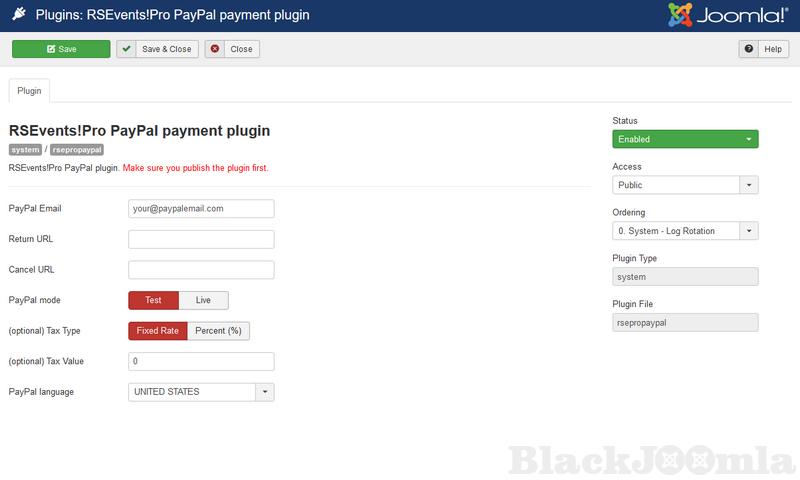
The PayPal plugin is purchased separately and requires installation. The integration uses the PayPal Payments Standard method - the customer will be redirected to the Paypal page when the registration form is submitted where he will need to log in to his PayPal account and manually approve the transaction.
Configuration parameters
- Paypal Email: the primary email address of your PayPal account
- Return URL: after the payment has been completed, you can redirect to the configured URL
- Cancel URL: A URL to which PayPal redirects the buyers' browsers if they cancel checkout before completing their payments. For example, specify a URL on your website that displays a 'Payment Canceled' page. Default – PayPal redirects the browser to a PayPal webpage.
- Paypal mode: Test / Live - a tax can be applied on total ticket purchase amount
- (optional) Tax Type: Percent (%) / Fixed Rate
- (optional) Tax Value: numeric value of tax
- Paypal language: the PayPal page can be displayed in the selected language
The transaction details can also be viewed from the RSEvents!Pro back-end area, by accessing the Components > RSEvents!Pro > Subscribers tab.
Note:
In "Test" mode you will require a PayPal Sandbox account.
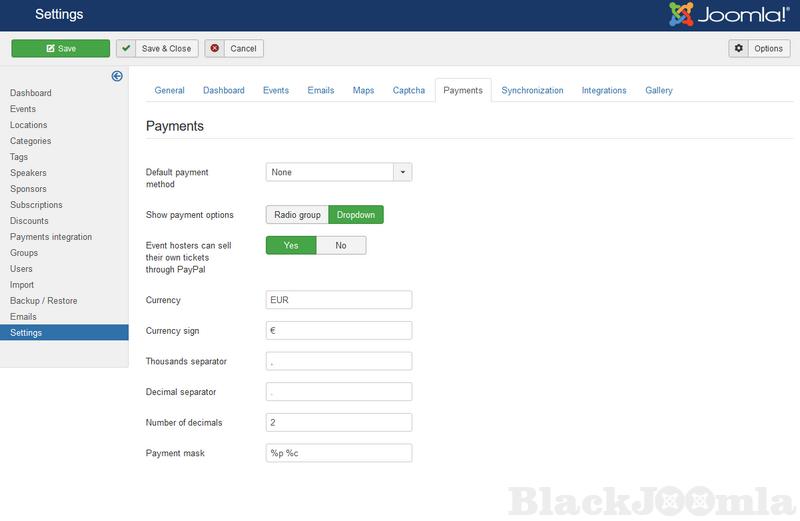
When using the RSEvents!Pro PayPal Payment plugin you can enable the "Event hosters can sell their own tickets through PayPal" option (Components > RSEvents!Pro > Settings > Payments). This will allow event owners to specify their own PayPal address when creating an event.
Download
Login to Download
Registration at BlackJoomla is completely free. However, an active membership or an individual file purchase is required to download premium files. Please visit our FAQ for more information.
Note: If you see the warning "The security token did not match." after logging in, simply refresh the page and sign in again.
Get started with 12 free downloads every month!
See our Membership Plans for more details.
Message
Before send message Please study FAQ
All of files compressed by WinRAR - use from Latest WinRAR before install
Password for all files:BlackJoomla.com
Do not use download managers such as IDM or similar software when downloading files. These applications may split a single download into multiple requests, which can cause your download count to be deducted incorrectly.