AutoMeta for K2 helps to automate generation of meta keywords and description for K2 items, using values of:
- Item title
- Category name
- Tags
- Extra Fields
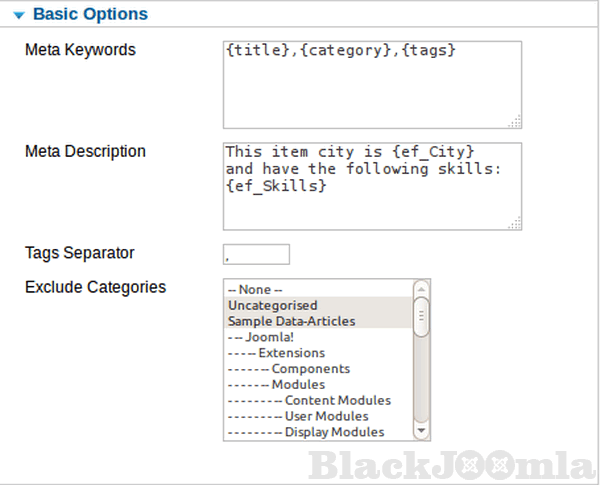
Just write the required format for keywords and description in the proper parameters, and the plugin will substitute each tag with its value.
You can use plugin parameters of the plugin to be applied to ALL categories, or use category parameters to be applied to a specific category, and category parameters override plugin parameters.
To keep the item meta keywords and description entered manually, the plugin does not override them if they are existing.
The plugin parameters description as the following:
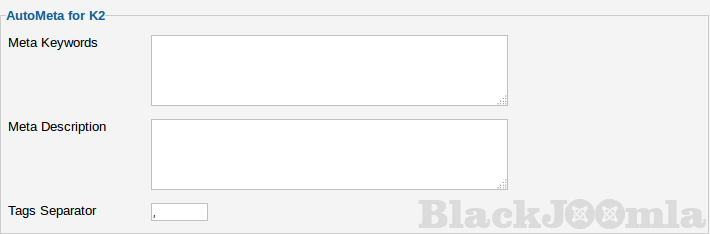
Meta Keywords: The text entered in this box will be applied to all K2 items keywords, will be displayed as "Keywords" html meta tag in the item page, after replacement of tags between '{' and '}' as described in the Available Tags section.
Meta Description: The text entered in this box will be applied to all K2 items, will be displayed as "Description" html meta tag in the item page, after replacement of tags between '{' and '}' as described in the Available Tags section.
Tags Separator: A character to separate item tags when replaced in the Meta Keywords and Meta Description boxes.
Exclude Categories: Select categories which items will be excluded from automatic generation of meta keywords and description.
Seeking for more flexibility, Meta Keywords, Meta Description and Tags Separator are repeated on the category level, where they override plugin level parameters. This way you are able to handle specific categories in a special manner if required.
Available Tags
{title}: This will be replaced by item title when used in Meta Keywords and/or Meta Description, at both levels: Plugin and Category.
{category}: This will be replaced by category name when used in Meta Keywords and/or Meta Description, at both levels: Plugin and Category.
{introtext}: This will be replaced by item introtext when used in Meta Keywords and/or Meta Description, at both levels: Plugin and Category.
{tags}:This will be replaced by item tags, separated by Tags Separator, when used in Meta Keywords and/or Meta Description, at both levels: Plugin and Category.
{ef_FieldAlias}:This will be replaced by extra field value, with alias "FieldAlias", when used in Meta Keywords and/or Meta Description, at both levels: Plugin and Category.
Download
Login to Download
Registration at BlackJoomla is completely free. However, an active membership or an individual file purchase is required to download premium files. Please visit our FAQ for more information.
Note: If you see the warning "The security token did not match." after logging in, simply refresh the page and sign in again.
Get started with 12 free downloads every month!
See our Membership Plans for more details.
Message
Before send message Please study FAQ
All of files compressed by WinRAR - use from Latest WinRAR before install
Password for all files:BlackJoomla.com
Do not use download managers such as IDM or similar software when downloading files. These applications may split a single download into multiple requests, which can cause your download count to be deducted incorrectly.